How to appear offline in Fortnite?

Fortnite, being a popular battle royale game, often involves teaming up with friends for various game modes. However, there are times when players prefer to play solo and avoid party invitations without the need to decline them.
Is there a way to appear offline in Fortnite?
Fortnite doesn't offer a traditional "appear offline" mode. Instead, you can set your status to Away to reduce incoming party invites and notifications.
Setting your status to Away reduces the likelihood of receiving party invites but doesn't make you completely invisible. Here is how.

How to Change Your Online Status in Fortnite:
Open Fortnite:
Launch the Fortnite game on your preferred platform.
Access Menu:
Click on the three horizontal lines located at the top left-hand corner of the screen to access the menu.
Navigate to Profile:
Click on your profile picture, which appears on the top left-hand side of the menu.
Toggle Online Status:
Look for the "Online Status" option, and toggle it to "Away" to appear offline in Fortnite.
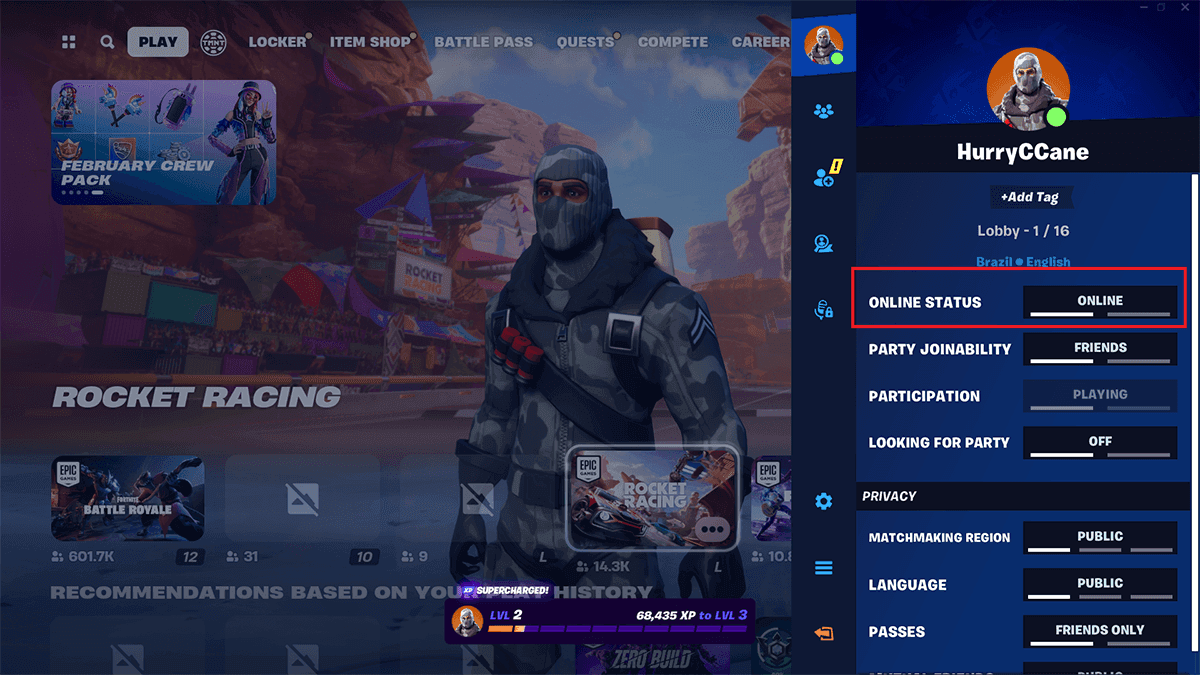
Adjust Party Privacy:
Additionally, click on "Party Privacy" and change it to "Private" to further control your gaming session.
How to Change Your Status to Offline in Epic Games Launcher:
Open Epic Games Launcher:
Launch the Epic Games Launcher on your computer.
Access Settings:
Click on your profile picture located in the top right-hand corner of the launcher.
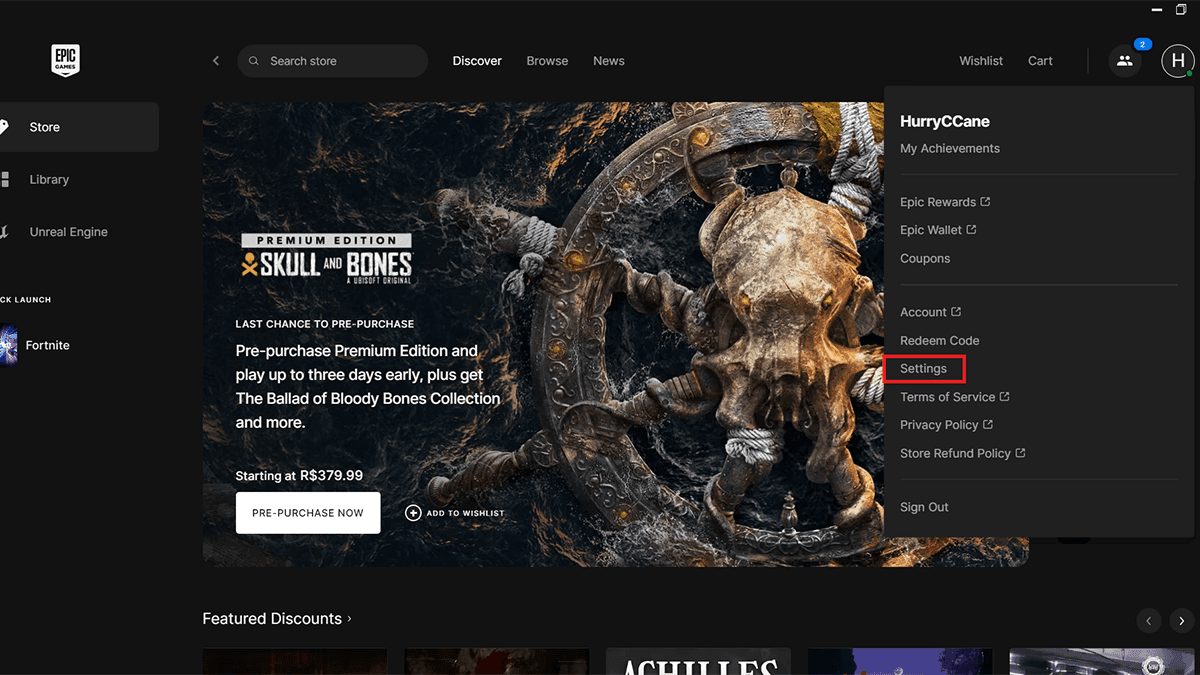
Navigate to Preferences:
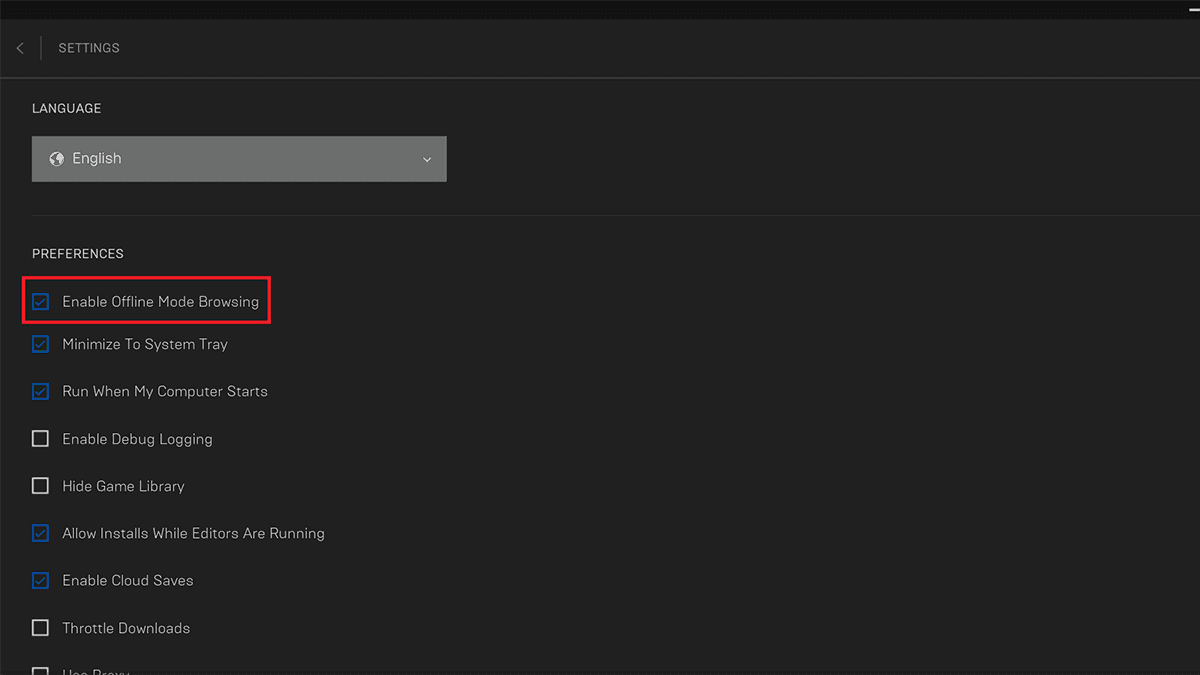
Scroll down to find "Settings," then under "Preferences," locate the "Enable Offline Mode Browsing" option.
Toggle Offline Mode:
Click on the checkbox to activate the offline status in the Epic Games Launcher.
For Xbox Players:
Open Xbox Live:
Launch Xbox Live on your Xbox console.
Access Profile Settings:
Click on the profile picture located in the top left-hand corner.
Toggle Appear Offline:
Scroll down and select the "Appear Offline" option to change your online status.
For PlayStation Users:
Open Fortnite Menu:
Launch Fortnite on your PlayStation console.
Access Settings:
Press the "X" button to open the Menu, then press the "Triangle" button to access Settings.
Toggle Online Status:
Under "Online Status," select "Away" to appear offline.
Adjust Party Privacy:
Similarly, select "Party Privacy" and change it to "Private" for additional control.
To revert to appearing online, simply follow the same steps and toggle your status back to "Online." With these easy steps, you can seamlessly manage your online presence in Fortnite according to your preferences.
FAQs
How to hide online status on Epic Games / Fortnite
Fortnite doesn’t have a true “appear offline” mode. You can set your status to Away in the Epic Games Launcher or in-game to appear less active. This reduces notifications and party invites but doesn’t make you completely invisible.
How to make presence unknown in Fortnite
Set your Online Status to Away and change Party Privacy to Private. Only invited players can join, and friends will see you as inactive.
Can I play Fortnite in offline mode?
Fortnite requires an internet connection to play, as it is an online multiplayer game. There is no official offline mode available. However, you can play other games in your Epic Games library that support offline play while in Offline Mode.
How to appear private in Fortnite
- Set your status to Away.
- Adjust Party Privacy to Private.
- Limit friend requests in your account settings if desired.
What does Away status mean in Fortnite?
Away status indicates you haven’t been active for a short period. Friends see you as inactive, which can help reduce invites and notifications without fully disconnecting.
All Related Guides
 Fortnite Galaxy Sprites guide: Every Galaxy Sprite, locations, buffs & farming tipsEverything you need to know about Fortnite Galaxy Sprites, including all variants, spawn locations, Galaxy Hou...
 Only Fortnite Sprite checklist you need (Chapter 7 Season 3)Looking for a Fortnite Sprite checklist? See every Sprite, Gold, Gummy, and Galaxy variant in Chapter 7 Season...
 What's the rarest Sprite in Fortnite? Fortnite Sprite chances explainedWondering what's the rarest Sprite in Fortnite? Discover Fortnite Sprite drop rates, rarity rankings, chances,...
 How to trade Sprites in Fortnite Chapter 7 Season 3Learn how to trade Sprites in Fortnite Chapter 7 Season 3, including Burnt Peanut Sprite trades, extraction re...
 How rare is the Burnt Peanut Sprite in Fortnite? Drop rate, player count & how to get itLearn the Burnt Peanut Sprite drop rate, rarity, best farming methods, extraction tips, and how to unlock it i...
 How to find Gummy Sprites in Fortnite Chapter 7 Season 3Learn how to find Gummy Sprites in Fortnite Chapter 7 Season 3, their locations, extraction rewards, and best ...
 Fortnite Relic Chest (Rare Chests): Locations, Sprites & moreLearn where to find Fortnite Relic Chests, what loot they contain, Sprite drop chances, and the best farming r...
 How to get every Sprite in Fortnite Chapter 7 Season 3Learn how to get every Sprite in Fortnite Chapter 7 Season 3, including locations, extraction tips, abilities,...
- 1
- 2
- 3
- 4
- 5
- 6
- 7
- 8
- 9
- 10
- 11
- 12
- 13
- 14
- 15
- 16
- 17
- 18
- 19
- 20
- 21
- 22